Ajay Kumar
Quick answer: what to do when your Facebook ad account is disabled
Open Account Quality in Meta Business Suite (or Business Support Home), select the restricted ad account and read the reason. If you believe it's a mistake, click Request review, complete any identity verification or security steps Meta asks for, and track the case under your support cases. Many reviews finish within 24-48 hours. Don't create new accounts to get around the restriction - that can lead to permanent bans.
Few things are more stressful for an advertiser than opening Ads Manager and seeing "Your ad account has been restricted" - especially in the middle of a sale. Ads stop, sales drop, and Meta's message often feels vague. For a brand spending ₹10 lakh a month, that is over ₹33,000 of daily spend switched off.
Most restrictions can be fixed if you follow the right process. This guide explains why it happens, exactly what to do, and how to avoid it next time.
Restricted vs disabled: what's the difference?
Meta can restrict different things, and the fix depends on which one:
| What is restricted | What it means |
|---|---|
| An ad account | That ad account can't run ads; others in your portfolio may still work. |
| Your personal profile | You can't manage ads on any account until it's resolved. |
| A business portfolio | All ad accounts and assets in that portfolio are affected. |
| A single ad | Only that ad is rejected - the account is fine (for now). |
Why Meta disables ad accounts
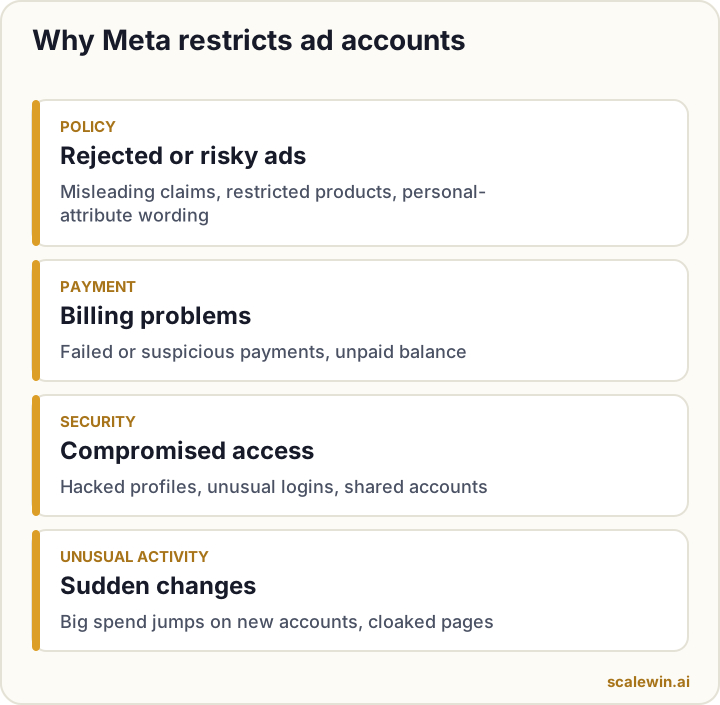
1. Advertising policy violations
Repeated rejected ads, misleading claims ("lose 10 kg in 7 days"), prohibited or restricted products, before/after images in sensitive categories, or targeting language that implies personal attributes ("Are you diabetic?").
2. Payment problems
Failed payments, an unpaid balance, a card flagged as suspicious, or many different cards used in a short time.
3. Security and compromised accounts
Logins from unusual locations, a hacked admin profile, or many people sharing one login. Meta restricts accounts quickly when it suspects hacking.
4. Unusual activity
A brand-new account that suddenly spends heavily, sudden changes in what you advertise, or landing pages that look different to reviewers than to users.
How to fix a disabled Facebook ad account: step by step
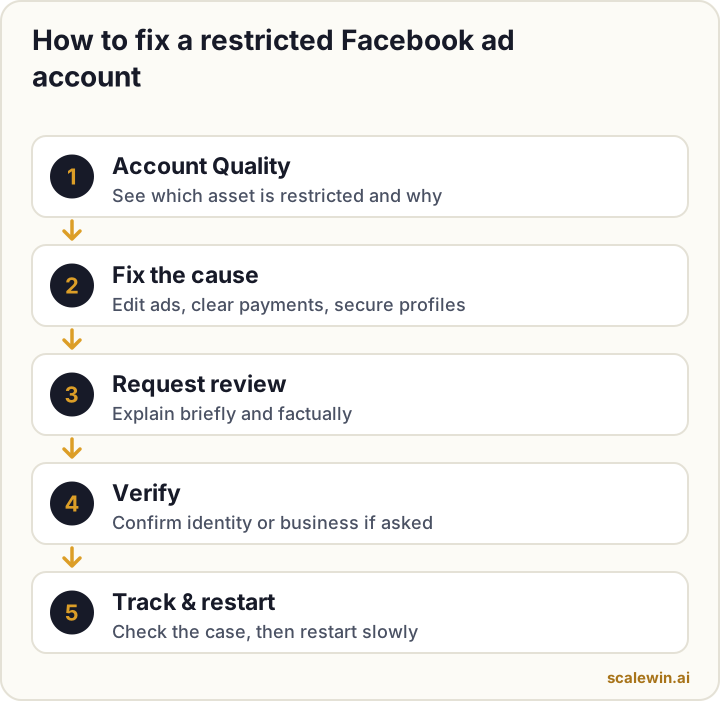
- Open Account Quality. In Meta Business Suite go to Account Quality (or visit Business Support Home). It shows every restricted asset and the reason.
- Read the exact reason. Click the restricted ad account or profile to see which policy or issue triggered it.
- Fix the cause first. Edit or delete rejected ads, clear any outstanding balance, update your payment method, or secure hacked profiles (change passwords, remove unknown admins, turn on two-factor authentication).
- Click "Request review". Explain briefly and factually what happened and what you changed. Only admins can request a review.
- Complete verification. Meta may ask you to confirm your identity with an ID document or verify your business. Use real, matching details.
- Track the case. Check the status in Account Quality or your support cases. Many decisions arrive within 24-48 hours.
- Restart carefully. Once reinstated, turn campaigns back on and avoid sudden huge budget increases for a few days.
If the review is rejected
Read the decision carefully. If there is an option to appeal again, only do so if you have new information or have fixed something further. If you advertise through an agency or a Meta partner, they may be able to escalate through Meta's partner support.
What NOT to do
How to prevent your ad account from being restricted
Prevention checklists
Account security checklist
- Two-factor authentication on every admin profile.
- At least two trusted admins, with no shared logins.
- Remove old employees and agencies you no longer work with.
Payment checklist
- One reliable payment method, with a backup.
- Pay outstanding balances quickly and watch Meta's billing emails.
Ad and website checklist
- No exaggerated health, income or before/after claims.
- A landing page with real contact details, a privacy policy and terms.
- Review rejected ads and fix them instead of re-uploading the same thing.
- Scale new accounts gradually rather than moving ₹1,00,000 a day onto a brand-new account overnight.
Monitor account quality regularly
Check Account Quality weekly. A few rejected ads are an early warning - fix them before they add up to a restriction.
A note on fake "Meta support" messages
Scammers often message advertisers pretending to be Meta, asking for passwords or payments to "unlock" accounts. Meta will never ask for your password. Only act inside Account Quality and official Meta Business Suite pages.
Key takeaways
- Start in Account Quality - it tells you which asset is restricted and why.
- Fix the cause (ad, payment or security) before requesting a review.
- Request a review only once, clearly, and complete any verification Meta asks for.
- Never create new accounts to get around a restriction.
- Prevent repeats: two-factor authentication, clean payments, policy-safe ads and a proper privacy policy.
Disabled Facebook ad accounts: frequently asked questions
Why was my Facebook ad account disabled?
How long does a Facebook ad account review take?
Can I create a new ad account if mine is disabled?
What if my personal Facebook profile is restricted from advertising?
Will my ads restart automatically after reinstatement?

Ajay is the founder of ScaleWin. He works hands-on with Meta Ads, Google Ads and SEO for Indian D2C and service brands, and built ScaleWin so that the daily work of a performance marketer - reading numbers, pausing losers, scaling winners - happens automatically.
Drafted with AI assistance. How these articles are written
Keep your ad account healthy
ScaleWin monitors your Meta account every day and flags rejected ads and issues early - before they turn into restrictions.
Start your 3-day free trial