Ajay Kumar
Quick answer: what is a Meta Advantage+ campaign?
A Meta Advantage+ campaign is a Sales, Leads or App campaign where three automation levers are switched on: Advantage+ campaign budget, Advantage+ audience (or location-only targeting) and Advantage+ placements. In 2025, Advantage+ Sales replaced Advantage+ Shopping - bringing back ad sets, audience suggestions and exclusions - and Meta began phasing out the old campaign type.
If you have created a Meta campaign recently, you have probably seen "Advantage+" on almost every screen. Meta has moved from offering automation as an option to making it the default. Understanding what Advantage+ actually switches on - and what you still control - is now essential for anyone running Facebook or Instagram ads.
What is a Meta Advantage+ campaign?
Advantage+ is Meta's name for its AI automation. A campaign counts as an Advantage+ campaign when three automation levers are all switched on:
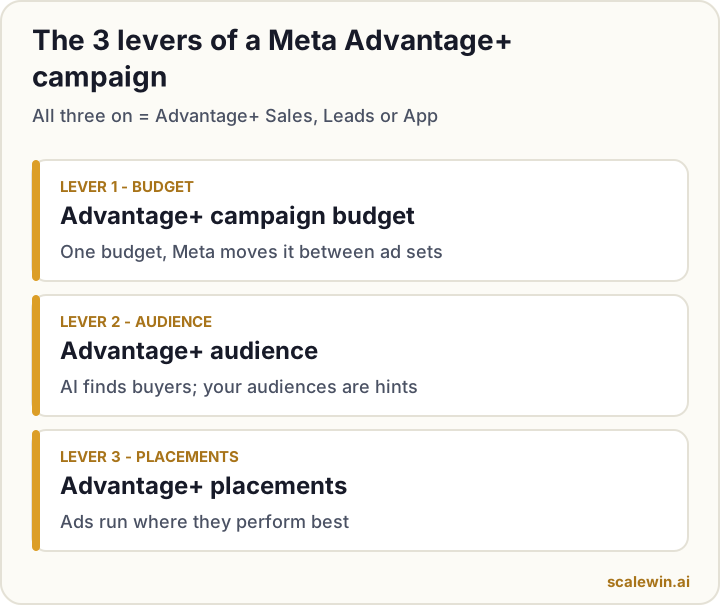
Lever 1: Advantage+ campaign budget
You set one budget at campaign level, and Meta distributes it across ad sets in real time, putting more money where results are cheapest.
Lever 2: Advantage+ audience
Instead of fixed interests, Meta's AI finds the people most likely to convert. You can add audience suggestions (such as past customers or interests) as hints, but the AI can go beyond them. Targeting by location only also qualifies.
Lever 3: Advantage+ placements
Your ads can appear across Facebook, Instagram, Reels, Stories, Messenger and Audience Network, with Meta choosing the best mix.
When all three are on, Meta labels the campaign Advantage+ Sales, Advantage+ Leads or Advantage+ App, depending on the objective.
What changed: Advantage+ Shopping became Advantage+ Sales
In 2025 Meta replaced Advantage+ Shopping campaigns with Advantage+ Sales campaigns, and later started removing the ability to create the old campaign type through its API. The main differences:
| Advantage+ Shopping (old) | Advantage+ Sales (current) | |
|---|---|---|
| Ad sets | None - one campaign, one bucket | Ad sets are back |
| Audience suggestions | Not available | Available as hints |
| Custom audience exclusions | Not available | Available |
| Existing customer budget cap | Available | Removed - use separate ad sets instead |
| Ads limit | Up to 150 per campaign | Up to 50 per ad set |
What this means for existing campaigns
Older campaigns keep running, but editing them in the current Ads Manager may prompt an upgrade to the new Advantage+ structure. If you relied on the existing-customer budget cap, recreate it with two ad sets - one for new customers (excluding past buyers) and one for existing customers - with budgets you control.
When should you use Advantage+?
Advantage+ works best when
- Your Meta Pixel and Conversions API are tracking purchases or leads correctly.
- You get a steady flow of conversions (Meta's learning phase looks for roughly 50 optimisation events a week per ad set).
- You can supply several genuinely different creatives.
Be careful when
- Tracking is new or unreliable - fix it first.
- You must reach a very specific group (e.g. a licensed profession) - you may need tighter targeting.
- Your budget is spread across many products or markets - even at ₹10 lakh a month, keep the structure simple so each ad set still gets enough conversions.
How to set up an Advantage+ Sales campaign
- Create a campaign with the Sales objective in Ads Manager.
- Keep Advantage+ campaign budget on and set a daily budget.
- Choose your conversion event - usually Purchase from your Pixel.
- Set location and age minimum, then keep Advantage+ audience on. Add your customer list as a suggestion if you have one.
- Add exclusions if you want to focus on new customers.
- Keep Advantage+ placements on.
- Upload 4-8 different creatives - images, videos and a carousel with different angles.
- Publish and wait about 7 days before judging or making big changes.
Advantage+ best practices
Creative is now your targeting
With the audience on automatic, your creative decides who responds. A video aimed at new mothers will find new mothers. Use different hooks and formats to reach different buyer groups - and refresh them before creative fatigue sets in.
Judge on profit, not platform ROAS
Advantage+ will chase the conversions you ask for. Compare its cost per purchase with your break-even and remember that Meta's reported revenue includes tax (GST in India, VAT in the UK, EU and Gulf, sales tax in the US) and doesn't subtract returns.
Don't over-split
More ad sets mean less data in each. Start with one or two and only split when you have a clear reason (new vs existing customers, very different products).
Common Advantage+ mistakes
- Running it with broken or missing conversion tracking.
- Uploading ten near-identical ads and calling it "creative testing".
- Editing budgets and creatives every day during learning.
- Judging success on ROAS without knowing break-even.
The bottom line on Advantage+
Advantage+ is no longer optional - it is how Meta wants ads to run. Give it clean data, a clear goal and a steady supply of different creatives, and it does the heavy lifting.
Key takeaways
- Advantage+ = campaign budget + audience + placements, all on automatic.
- Advantage+ Sales replaced Advantage+ Shopping and brought back ad sets and exclusions.
- The AI needs good conversion tracking and enough conversions to learn.
- Creative diversity is your main lever inside Advantage+.
- Use ad sets or exclusions to control spend on existing customers.
Meta Advantage+: frequently asked questions
What is the difference between Advantage+ Shopping and Advantage+ Sales?
Does Advantage+ work for a ₹10 lakh a month account?
Can I exclude existing customers in Advantage+ Sales?
How many ads should I put in an Advantage+ ad set?
Should I turn off Advantage+ placements?

Ajay is the founder of ScaleWin. He works hands-on with Meta Ads, Google Ads and SEO for Indian D2C and service brands, and built ScaleWin so that the daily work of a performance marketer - reading numbers, pausing losers, scaling winners - happens automatically.
Drafted with AI assistance. How these articles are written
Let ScaleWin run your Advantage+ campaigns
ScaleWin sets up Advantage+ properly, feeds it fresh creative and judges every ad on profit - daily.
Start your 3-day free trial